How to Avoid 5G Radiation in Your Home
Hey there! If you’re reading this, you’re probably curious or maybe even a bit concerned about 5G radiation and how it might affect your home. I get it—new technology can feel exciting but also a little overwhelming. When I first heard about 5G, I was intrigued by its speed but also wondered about its safety. After diving deep into research and experimenting with practical solutions in my own home, I’ve learned a lot about how to minimize exposure to 5G radiation.
I’m excited to share what I’ve found with you in a way that’s easy to understand and apply. Whether you’re a tech enthusiast or just someone who wants to keep their family safe, this guide is for you. Let’s explore how to create a safer, healthier home environment together.
Understanding 5G and Its Radiation
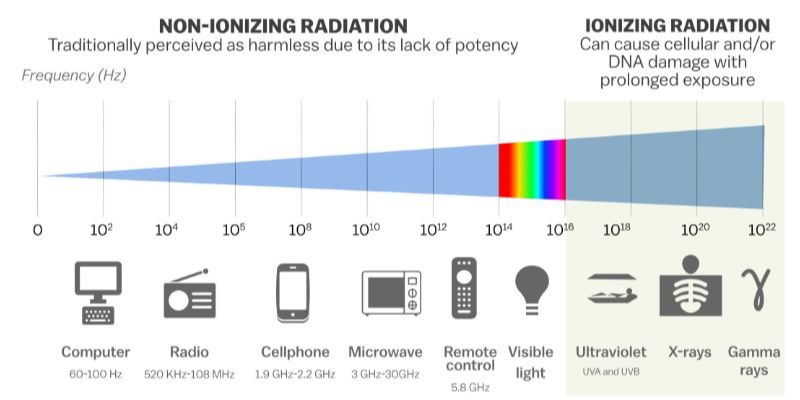
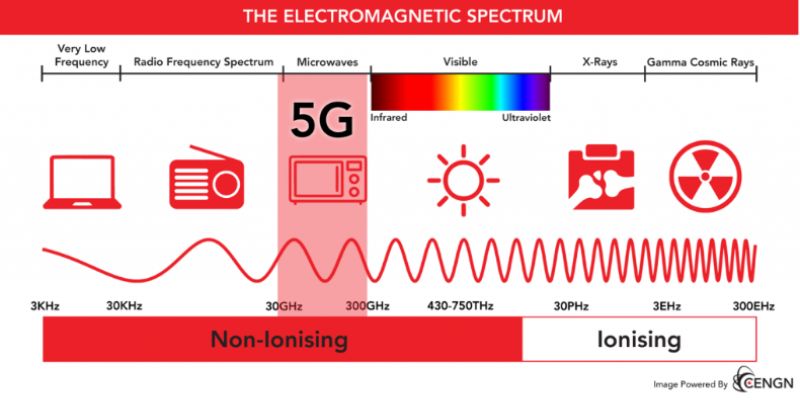
Let’s start with the basics. 5G, or fifth-generation wireless technology, is the latest network for our phones, tablets, and other devices. It’s faster and more efficient than 4G, which is awesome for streaming or gaming. But it also uses higher-frequency radio waves, called millimeter waves, to transmit data. These waves are part of what’s known as non-ionizing radiation. Unlike X-rays or UV rays, non-ionizing radiation doesn’t have enough energy to break DNA, but it can still generate heat in the body, which raises questions for some people.
I remember when I first learned about 5G towers popping up in my neighborhood. I wondered, “Is this safe for me and my family?” The truth is, scientists are still studying the long-term effects of 5G. While the FDA and CDC say it’s safe based on current evidence, I believe it’s smart to take precautions, especially if you’re worried about exposure in your home. The good news? There are practical steps you can take to reduce 5G radiation without giving up your tech.
Why Reducing 5G Radiation Matters
You might be wondering why you should care about 5G radiation in the first place. For me, it’s about peace of mind. I love technology, but I also want my home to be a safe sanctuary. Some studies suggest that prolonged exposure to electromagnetic fields (EMF), including those from 5G, might cause mild symptoms like headaches or fatigue for sensitive individuals. While the science isn’t conclusive, I’ve spoken to friends who feel better when they limit their exposure. Plus, with 5G towers and devices becoming more common, it’s easier than ever to be surrounded by these signals.
Reducing exposure isn’t about fear—it’s about being proactive. By making small changes, you can lower potential risks while still enjoying the benefits of modern technology. Let’s dive into the steps I’ve taken in my home to keep 5G radiation at bay.
Create Distance from 5G Sources
One of the simplest ways I’ve found to reduce 5G radiation is to create distance between myself and the sources. 5G signals weaken significantly as they travel through walls, furniture, or even air. The farther you are from a 5G device or tower, the less exposure you get.
In my home, I started by identifying where 5G signals were coming from. My Wi-Fi router, for example, was a big one since many modern routers now support 5G bands. I moved it from the living room, where we spend most of our time, to a corner of the house near my office. I also checked for nearby 5G towers using online maps provided by my cell carrier. If you live close to a tower, consider rearranging your home so your main living spaces—like your bedroom or couch—are farther from it.
For devices like smartphones, I try not to keep them pressed against my body all the time. Instead of carrying my phone in my pocket, I place it in a bag or on a table when I’m at home. Small changes like these can make a big difference.
Use Wired Connections Whenever Possible
One of the best decisions I made was switching to wired connections where I could. Wi-Fi is convenient, but it’s a constant source of EMF radiation, especially with 5G-enabled routers. I invested in Ethernet cables for my computer and gaming console, and I noticed a difference in how “quiet” my home felt—no constant Wi-Fi signals buzzing around.
If you’re like me and love streaming movies, you can connect your smart TV to the internet with an Ethernet cable too. It’s a bit of a hassle to set up at first, but the connection is faster and more stable, which is a nice bonus. For phone calls, I use a wired headset instead of holding my 5G phone to my ear. This keeps the device farther from my head and reduces exposure.
If you’re not ready to go fully wired, try turning off your Wi-Fi at night or when you’re not using it. I set my router on a timer to shut off automatically after midnight. It’s a small step, but it gives me peace of mind knowing my family isn’t surrounded by signals while we sleep.
Shield Your Home with EMF-Blocking Materials
This one was a game-changer for me. There are materials designed to block or reduce EMF radiation, and I’ve used a few in my home. For example, I bought EMF-blocking curtains for my bedroom windows. These curtains have metallic fibers woven into them, which help block signals from nearby 5G towers. I noticed a difference in how restful my sleep felt after installing them.
You can also use EMF-blocking paint for walls, especially if you live in an apartment near a cell tower. I painted one wall in my home office with this special paint, and it’s made the space feel calmer. If you’re not ready to repaint, you can try smaller solutions like EMF-blocking phone cases or laptop shields. I use a shielded phone case, and it’s reassuring to know it’s reducing my exposure when I’m scrolling through my phone.
Here’s a quick table of EMF-blocking products I’ve tried and recommend:
| Product | Purpose | Where to Use | My Experience |
|---|---|---|---|
| EMF-blocking curtains | Block signals from outside towers | Bedrooms, living rooms | Improved sleep quality, easy to install |
| EMF-blocking paint | Shields walls from EMF penetration | Home office, bedrooms | Noticeable reduction in signal strength |
| EMF-blocking phone case | Reduces radiation from phone | Daily use with smartphone | Lightweight and effective |
| Laptop radiation shield | Protects lap from EMF during use | Workspaces, travel | Comfortable and portable |
These products aren’t cheap, but they’re worth it if you’re serious about reducing 5G exposure. Just make sure to buy from reputable brands to ensure they actually work.
Limit 5G-Enabled Devices in Your Home
I’ll be honest—when 5G first rolled out, I was excited to upgrade all my devices. But then I realized that every 5G-enabled gadget adds to the EMF in my home. Now, I’m more selective. For example, I kept my old 4G phone for a while instead of upgrading to a 5G model right away. If you don’t need the extra speed, sticking with older devices can reduce your exposure.
You can also turn off 5G on devices that allow it. On my smartphone, I went into the settings and switched it to 4G-only mode when I’m at home. It still works great for calls and browsing, and I’m not constantly connected to 5G signals. Check your router settings too—many let you disable the 5G band and use 2.4 GHz instead, which has a lower frequency.
Another tip? Limit the number of smart devices in your home. I had a smart thermostat, smart speaker, and smart lights, but I’ve scaled back to just the essentials. Each device emits some level of EMF, so fewer devices mean less radiation.
Optimize Your Home’s Layout
This one might sound simple, but rearranging your furniture can help. I moved my bed away from the wall closest to a nearby 5G tower. I also made sure my kids’ play area wasn’t directly under the Wi-Fi router. These small tweaks reduce how much radiation you’re exposed to in the spaces where you spend the most time.
If you’re setting up a new home or apartment, think about where your Wi-Fi router and other devices will go. I placed my router in a less-used area of the house, like a hallway, instead of the kitchen or living room. If you can’t move your router, try elevating it or placing it behind a piece of furniture to create a barrier.
For sleeping, I recommend keeping electronics out of the bedroom altogether. I used to charge my phone next to my bed, but now I leave it in the living room. It’s not just about radiation—it’s also helped me sleep better without the temptation to scroll late at night.
Use Airplane Mode Strategically
Airplane mode is my secret weapon. When I’m not using my phone or tablet, I switch it to airplane mode to stop it from sending or receiving 5G signals. This is especially helpful at night or when I’m working at my desk and don’t need to be connected.
For example, I put my phone in airplane mode during family dinners. It’s a great way to stay present and reduce unnecessary exposure. If you’re worried about missing calls, you can still use Wi-Fi in airplane mode for apps like FaceTime or WhatsApp, but it’s best to keep Wi-Fi off too if you’re going for maximum protection.
I also encourage my kids to use airplane mode on their tablets when they’re watching downloaded movies or playing offline games. It’s a simple habit that’s easy to teach and makes a difference over time.
Stay Informed About Local 5G Infrastructure
One thing I learned is that 5G towers and small cells are popping up everywhere, especially in cities. I reached out to my local government and checked with my cell provider to learn where towers were installed near my home. This helped me understand which areas of my house might be getting stronger signals.
If you’re in the USA, you can use websites like AntennaSearch.com or CellMapper.net to find nearby towers. Knowing where the signals are coming from can help you make smarter choices, like where to place EMF-blocking materials or how to arrange your furniture.
I also keep an eye on news about 5G expansions in my area. Sometimes, new towers go up without much notice, so staying informed lets me adjust my home setup if needed.
Support Your Health Naturally
Reducing 5G radiation is just one piece of the puzzle. I’ve found that supporting my overall health helps me feel better, regardless of EMF exposure. Eating a balanced diet, staying hydrated, and getting enough sleep all strengthen your body’s resilience.
I also spend time outdoors every day. Fresh air and natural sunlight seem to counteract the “heavy” feeling I sometimes get from being around electronics. Grounding, or walking barefoot on grass or soil, is another trick I’ve tried. Some people say it helps neutralize EMF effects, and while I’m not sure about the science, it’s relaxing and free!
Exercise is another big one. I go for walks or do yoga to keep my body strong and stress levels low. A healthy body is better equipped to handle any potential effects of radiation, so I make self-care a priority.

Conclusion
Exploring ways to avoid 5G radiation in my home has been an eye-opening journey. It’s not about living in fear or ditching technology altogether—it’s about making informed choices to create a safer, healthier space for myself and my family. From moving my router to using EMF-blocking curtains, each step has given me more control over my environment. I love that I can still enjoy my devices while taking practical steps to reduce exposure.
The best part? These changes are simple and doable for anyone. Whether you’re tech-savvy or just starting to learn about 5G, you can make a difference with small adjustments. I encourage you to try one or two of these tips and see how they feel. Your home is your sanctuary, and with a little effort, you can make it a place where you feel safe and at ease. Let’s keep learning and adapting together as technology evolves!
FAQs
Is 5G radiation dangerous for my health?
I get this question a lot, and it’s a valid concern. Based on what I’ve read, the science is still evolving. The FDA and WHO say 5G’s non-ionizing radiation is safe at current levels, but some people report feeling sensitive to EMF. I take a cautious approach by reducing exposure where I can, just for peace of mind.
Can I completely block 5G radiation in my home?
Completely blocking 5G is tough because signals can come from multiple sources, like towers and devices. But I’ve found that using EMF-blocking materials, creating distance, and limiting 5G devices significantly reduces exposure. It’s about minimizing, not eliminating.
Are EMF-blocking products worth the cost?
In my experience, yes, but it depends on your budget and needs. I started with affordable options like a phone case and curtains, and they’ve made a difference. Just make sure to buy from trusted brands, as not all products are equally effective.
How can I find 5G towers near my home?
I use websites like AntennaSearch.com or CellMapper.net to locate towers. You can also call your cell provider or check with local authorities. Knowing where towers are helps me plan my home layout to reduce exposure.
Does airplane mode stop all radiation from my phone?
Airplane mode stops your phone from sending or receiving 5G signals, which cuts down on radiation. I use it when I don’t need my phone connected, like at night. Keep in mind that some apps might still use Wi-Fi, so turn that off too for maximum effect.