How to Fix Fan Heater Blowing Cold Air
Is your fan heater blowing cold air when you need warmth? It can be super frustrating, especially when the weather gets chilly! Many folks find fixing this a bit tricky at first because there are a few common culprits, and sometimes it’s hard to know where to start.
For a closely related repair path, How to Fix Your Home Heater Easily can help readers narrow down the next troubleshooting step.
But don’t worry, we’ve got your back! This guide will walk you through simple steps to figure out why your fan heater is blowing cold air and help you fix it quickly. We’ll break down the most common reasons and show you easy solutions so you can get cozy again in no time.
Why Your Fan Heater Blows Cold Air
It’s a common problem when your fan heater, which you rely on to keep you warm, starts blowing only cold air. This can happen for several reasons, and identifying the exact cause is the first step to getting it fixed. Sometimes it’s a simple issue, like a thermostat setting, while other times it might be a component that’s not working right.
Understanding these common reasons will help you troubleshoot effectively.
Thermostat Settings and Malfunctions
The thermostat is like the brain of your fan heater. It tells the heater when to turn on and off to maintain a set temperature. If the thermostat isn’t set correctly, or if it’s faulty, your heater might not engage its heating elements at all, leading to cold air.
It’s the simplest thing to check first, and often the easiest fix.
Thermostat Set Too Low
This is the most frequent reason for a fan heater blowing cold air. People often forget to adjust the thermostat after a warmer day or if they accidentally bump the dial. If the set temperature is lower than the current room temperature, the heater won’t switch on its heating function.
You might hear the fan running, but no heat will be produced. Always check this first!
Faulty Thermostat Sensor
The sensor within the thermostat measures the room’s temperature. If this sensor is dirty, damaged, or simply broken, it can give incorrect readings. This means the heater might think the room is already warm enough, even when it’s cold.
A faulty sensor prevents the heating element from activating. Replacing a thermostat might be needed if cleaning doesn’t help.
Loose Thermostat Wiring
Inside your fan heater, wires connect the thermostat to other components. If these wires become loose over time due to vibration or wear, the signal telling the heater to warm up might not reach the heating element. This can cause intermittent problems or a complete failure to heat.
A professional might need to check these connections if they are not easily accessible.
Blocked Air Vents and Filters
Your fan heater needs to draw in air and push it out to circulate heat. If anything is blocking these airflow paths, it can cause problems. Dust and debris are common culprits, and they can really make your heater work harder, or even stop it from heating properly.
Dust Buildup on Vents
Over time, dust can accumulate on the air intake and outlet vents of your fan heater. This buildup restricts the airflow. When airflow is reduced, the heater might overheat internally and trigger a safety shutoff, or it might simply not be able to move enough air to feel warm.
Cleaning these vents regularly with a soft brush or vacuum attachment is important.
Clogged Air Filters
Some fan heaters have removable air filters designed to catch dust and particles. If these filters become clogged, they severely impede airflow. A blocked filter forces the fan to work harder and reduces the volume of warm air expelled.
It can also lead to the unit overheating, causing it to shut down. Most filters can be cleaned or replaced easily.
Obstructions Near the Heater
Placing furniture, curtains, or other items too close to the heater can block its air intake or exhaust. This physical obstruction prevents the heater from drawing in enough air to heat and expel it effectively. Always ensure there is adequate space around your fan heater for proper ventilation, typically at least a foot or two.
Heating Element Issues
The heating element is the core component responsible for generating heat. If this part isn’t working correctly, your fan heater will inevitably blow cold air.
Damaged or Burned-Out Heating Element
The heating element is essentially a coil of wire that heats up when electricity passes through it. Like any electrical component, it can wear out over time or fail due to manufacturing defects or power surges. If the element is broken or burned out, it won’t produce any heat, even though the fan might still be running.
This usually requires replacing the entire heating element or the unit.
Loose Connections to the Heating Element
Similar to thermostat wiring, the electrical connections that supply power to the heating element can become loose. If the heating element isn’t receiving sufficient or consistent power, it won’t heat up. This could be due to vibrations or improper installation.
Ensuring these connections are secure is vital for proper operation.
Overheating Protection Mechanism Tripped
Fan heaters have safety features to prevent them from overheating. If the unit detects it’s getting too hot (often due to blocked vents or a malfunctioning fan), it will shut off the heating element to prevent damage or fire. Sometimes, after cooling down, this protection mechanism might not reset properly, preventing the element from turning back on.
A manual reset button or a period of unplugging the unit might help.
Fan Motor Problems
The fan motor is what blows the air across the heating element and out into the room. If the fan motor is failing, it can impact the heating process in several ways.
Fan Not Spinning At All
If the fan motor has completely failed, the fan won’t spin. In this case, the heating element might still heat up, but without the fan to circulate the air, the heater will likely overheat very quickly and shut off due to its safety mechanisms. You won’t feel any air coming out, warm or cold.
This indicates a motor failure that needs repair or replacement.
Fan Spinning Too Slowly
A fan motor that is running but at a reduced speed means less air is being circulated. This can lead to insufficient heat distribution, making the air feel less warm than it should. It can also cause the heating element to overheat, potentially triggering the safety shutoff.
A slow-moving fan is a clear sign of a motor issue.
Fan Motor Overheating
If the fan motor itself overheats, it can also cause the heater to stop working. Overheating can be due to dust accumulation on the motor, worn bearings, or electrical problems within the motor. When the motor overheats, safety features will likely engage, shutting down the entire unit, including the heating element.
Power Supply Issues
Even the best fan heater won’t work if it’s not getting enough power. Sometimes the issue lies outside the heater itself.
Tripped Circuit Breaker or Blown Fuse
Fan heaters draw a significant amount of electricity. If the circuit they are plugged into is overloaded by other appliances, the circuit breaker can trip or a fuse can blow to protect the wiring from overheating. If your heater suddenly stops working, check your home’s electrical panel for tripped breakers or blown fuses.
Resetting the breaker or replacing the fuse might solve the problem, but if it keeps happening, you may need a dedicated circuit.
Loose Power Cord or Outlet
A damaged or loose power cord can prevent the heater from receiving consistent power. Similarly, a faulty wall outlet can cause intermittent power supply issues. If the power cord looks frayed or the plug is loose in the outlet, it’s a safety hazard and a potential reason for the heater not working.
Always ensure the cord and outlet are in good condition.
Voltage Drop
In some cases, a voltage drop in your home’s electrical system could mean the heater isn’t receiving the full voltage it needs to operate correctly. This is less common but can happen in older homes or if there are issues with your main power supply. A heater operating on low voltage might not produce heat effectively.
Step-by-Step Troubleshooting Guide
When your fan heater is blowing cold air, it’s natural to want a quick fix. Following a step-by-step approach helps you systematically identify the problem without getting overwhelmed. We will start with the easiest checks and move to more involved ones, so you can get your heater working again efficiently.
Initial Checks Anyone Can Do
Before you start taking things apart, there are a few simple things you should always check first. These are the most common reasons and the easiest to fix yourself, saving you time and potential repair costs. Most of these checks require no tools at all.
Check Thermostat Settings
This is the absolute first step. Ensure the thermostat is set to a temperature higher than the current room temperature. If it’s a dial, turn it to the highest setting briefly to test if heat is produced.
If you have digital controls, make sure the mode is set to heat and the temperature is appropriately high.
Inspect Air Vents and Filters
Look at the air intake and output vents. Are they clear of obstructions like dust bunnies, paper, or fabric? If your heater has a filter, carefully remove it and check for dust buildup.
If it looks dirty, clean it according to the manufacturer’s instructions. Some filters can be vacuumed, while others need washing.
Ensure Proper Ventilation
Make sure nothing is blocking the heater from the front or the back. There should be at least a foot of clear space around the unit. Curtains, furniture, or even piles of laundry can restrict airflow, causing the heater to malfunction or shut down.
Check the Power Cord and Outlet
Inspect the power cord for any visible damage, like cuts or fraying. Ensure the plug is firmly seated in the wall outlet. Try plugging another small appliance into the same outlet to confirm the outlet is working correctly.
If the cord looks damaged, do not use the heater.
Look for a Reset Button
Many fan heaters have a safety cut-off switch, often located on the bottom or back of the unit. If the heater has overheated, this button may have popped out. Press it firmly to reset it.
Sometimes, you might need to unplug the heater for a few minutes before the reset button will work.
Intermediate Checks for Slightly More Technical Users
If the initial checks don’t resolve the issue, you might need to look a little closer. These steps involve checking components that are usually accessible without full disassembly but require a bit more attention. Always unplug the heater before attempting these checks.
Testing the Fan Motor
With the heater unplugged, gently try to spin the fan blades by hand. They should move freely. If they are stiff or don’t move, the motor might be seized or obstructed.
Listen for any unusual grinding noises when you manually turn them. If the fan blades move but the fan doesn’t run when plugged in (and all other checks are clear), the motor itself might be faulty.
Checking Heating Element Connections
Unplug the heater. Locate the heating element, usually a visible coil or ceramic component. Check for any obvious signs of damage like breaks or discoloration.
More importantly, look for the wires connecting to the element. Ensure they are securely attached and not loose or corroded. If you see any signs of burning or melting around the connections, this is a problem.
Examining the Thermostat Sensor
The thermostat sensor is often a small metal probe or wire located near the air intake or the front grille. Gently wipe it with a dry, soft cloth to remove any dust. If it looks bent or damaged, this could be the cause.
A damaged sensor will not accurately report the room temperature.
Advanced Checks and Potential Repairs
These checks involve more advanced troubleshooting and may require some basic tools and knowledge of electrical components. If you are not comfortable working with electrical parts, it’s best to seek professional help for these steps. Remember to always unplug the heater and take safety precautions.
Testing the Heating Element with a Multimeter
To test the heating element, you’ll need a multimeter. First, unplug the heater. Disconnect the wires leading to the heating element.
Set your multimeter to measure resistance (Ohms). Touch the probes to the terminals where the wires were connected to the element. A good heating element will show a resistance reading (typically between 10 and 100 Ohms, depending on the heater).
If you get an “OL” (overload) reading, it means the element is broken and needs replacement. If the resistance is very low (close to zero), it might be shorted.
Testing the Fan Motor with a Multimeter
Similarly, you can test the fan motor. Unplug the heater and disconnect the wires from the motor. Set your multimeter to measure resistance.
Touch the probes to the motor’s terminals. A working motor will show a resistance reading. A reading of “OL” indicates a broken winding, and a near-zero reading indicates a short.
If the motor still doesn’t run after confirming it has power (see below), it’s likely faulty.
Verifying Power to Components
With the heater plugged in (and extreme caution exercised), you can use a multimeter to check if power is reaching the heating element and the fan motor. This requires identifying the wires that supply power to each component. If power is reaching a component but it’s not working, the component itself is faulty.
If no power is reaching the component, the problem lies further back in the wiring, switch, or control board.
Replacing Parts
If you identify a faulty part, such as a heating element, fan motor, or thermostat, you may be able to replace it. You’ll need to source an identical or compatible replacement part. The process usually involves carefully disconnecting the old part and connecting the new one, ensuring all wires are properly secured.
Always follow manufacturer guidelines or consult a professional if unsure.
Common Fan Heater Issues and Solutions Explained
Fan heaters are generally reliable, but like any appliance, they can develop issues. Understanding these common problems and their solutions can save you money and the hassle of replacing a perfectly fixable unit. We’ll break down some of the most frequent malfunctions and offer clear, actionable advice.
When the Fan Runs, But No Heat Comes Out
This is perhaps the most classic symptom of a fan heater blowing cold air. The fan motor is functional, spinning and moving air, but the air remains cold. This points to a problem with the heating mechanism itself or the components that control it.
Faulty Heating Element
The heating element is the most common culprit here. It’s the part that gets hot when electricity passes through it. If it’s burned out or broken, no heat will be generated, even though the fan is working perfectly fine.
This is especially common in older heaters or those that have been used extensively. The fix usually involves replacing the heating element.
Tripped Thermal Cut-Out (Overheating Protection)
Fan heaters have safety mechanisms to prevent them from overheating. If the unit gets too hot (often due to blocked vents or a malfunctioning fan), a thermal cut-out switch will trip, cutting power to the heating element. While the fan might continue to blow, it will be blowing unheated air.
Sometimes, this switch can be manually reset, but if it trips frequently, it indicates an underlying issue like poor ventilation or a weak fan motor.
Thermostat Not Activating the Heat
The thermostat tells the heating element when to turn on and off. If the thermostat is faulty or incorrectly set, it might not signal the heating element to activate. Even if the room is cold, a malfunctioning thermostat might incorrectly report a warm temperature, preventing heat production.
Checking and testing the thermostat is crucial in this scenario.
Wiring Issues to the Heating Element
The heating element needs a proper electrical connection to receive power. Loose, corroded, or broken wires connecting to the heating element will prevent it from heating up. This can be a gradual issue, with intermittent heat, or a sudden failure.
A visual inspection of the wiring is often sufficient to spot such problems, but careful testing with a multimeter might be necessary.
When the Heater Smells Burnt or Smoky
A burning smell coming from your fan heater is a serious warning sign and should be addressed immediately. It often indicates that something is overheating or burning inside the unit, which can be a fire hazard.
Dust Buildup on the Heating Element
Over time, dust and lint can accumulate inside the heater and settle on the heating element. When the heater is turned on, this dust burns off, creating a smoky or burnt smell. This is usually not dangerous if it’s a light accumulation and disappears quickly, but regular cleaning is important to prevent it.
However, if the smell is strong or persists, it could indicate a larger issue.
Motor Bearing Problems
If the fan motor’s bearings are dry or worn, the motor can overheat. This overheating can cause the plastic or metal parts around the motor to melt or burn, producing a distinct burning smell. The fan might also make squealing or grinding noises.
If you suspect this, unplug the heater immediately and consider professional repair or replacement.
Damaged Internal Wiring
Internal wiring within the heater can become damaged due to wear, overheating, or short circuits. Burnt insulation on wires can produce a strong, acrid smell. This is a significant fire risk, and the heater should not be used until it’s inspected and repaired by a qualified technician.
Foreign Objects Inside the Heater
Occasionally, small objects like paper, plastic fragments, or even insect nests can find their way into the heater. When the heating element gets hot, these objects can melt or burn, causing a smoky smell. Unplug the heater and carefully inspect the vents and interior for any foreign debris.
When the Heater Makes Unusual Noises
Noises coming from your fan heater can range from minor annoyances to serious indicators of mechanical failure. It’s important to identify the type of noise to understand the potential problem.
Rattling Noise
A rattling sound often means something is loose inside the heater. This could be a screw that has vibrated free, a loose fan blade, or a component that has detached from its mounting. If the noise is coming from the fan area, a loose fan blade is a likely cause.
If it’s coming from elsewhere, it might be a loose housing or internal part.
Grinding or Squealing Noise
This type of noise, especially if it comes from the fan area, usually indicates a problem with the fan motor bearings. The bearings allow the motor shaft to spin smoothly. When they wear out, they can cause friction, leading to grinding or squealing sounds.
This often means the motor needs to be replaced.
Clicking Noise
A clicking noise might be related to the thermostat cycling on and off, which is normal for some models. However, if the clicking is rapid, continuous, or accompanied by other issues, it could indicate a faulty switch or relay within the heater’s electrical system. It could also be a sign of a motor struggling to start.
Maintaining Your Fan Heater for Longevity
Proper maintenance is key to ensuring your fan heater performs reliably and lasts for a long time. Regular care not only prevents common issues like blowing cold air but also enhances safety and efficiency.
Regular Cleaning Schedule
Cleaning your fan heater regularly is one of the most effective ways to prevent problems. Dust and debris are the main enemies of these appliances.
Weekly Quick Clean
Once a week, especially during the heating season, quickly wipe down the exterior of the heater and check the visible vents. Use a soft, dry cloth or a vacuum cleaner with a brush attachment to remove any surface dust. This prevents light dust from accumulating and becoming a bigger issue.
Monthly Deep Clean
Once a month, or more often if you have pets or dusty conditions, perform a more thorough cleaning. Unplug the heater. Carefully remove any accessible filters and clean them according to the manufacturer’s instructions.
Use a vacuum cleaner with a crevice tool to reach into the vents and remove any accumulated dust or debris. Ensure the inside is dry before plugging it back in.
Before Storing
If you store your fan heater during warmer months, give it a thorough cleaning before putting it away. This prevents dust from settling into internal components while it’s in storage, making it cleaner when you take it out for the next heating season.
Safety Precautions During Maintenance
Safety should always be your top priority when cleaning or maintaining any electrical appliance, especially a heating device.
Always Unplug First
Before you start any cleaning or inspection, always unplug the fan heater from the electrical outlet. This is the most critical safety step to prevent electric shock. Never attempt to clean or inspect a plugged-in appliance.
Allow to Cool Down Completely
Ensure the heater has cooled down completely before you begin cleaning. The heating elements can remain hot for a significant time after being turned off, posing a burn risk. Wait at least 30 minutes after turning it off to be sure it’s cool to the touch.
Avoid Water and Solvents
Do not use water, liquid cleaning solutions, or harsh solvents to clean the inside of your fan heater. Moisture can damage electrical components and create a safety hazard. Stick to dry cleaning methods like vacuuming or using a dry brush.
Check for Damaged Cords
While cleaning, take a moment to inspect the power cord and plug for any signs of damage, such as fraying, cuts, or bent pins. If you find any damage, do not use the heater. The cord may need to be replaced by a qualified technician.
When to Seek Professional Help
While many fan heater issues are simple fixes, some problems require the expertise of a professional. Knowing when to call for help can save you from potential damage or safety risks.
Persistent Burning Smells
If you detect a persistent burning or smoky smell, especially one that doesn’t disappear after cleaning, it’s a sign of a serious internal issue, potentially a fire hazard. Do not continue to use the heater and call a qualified appliance repair technician immediately.
Loud Grinding or Squealing Noises
Unusual noises like loud grinding or squealing, particularly from the fan motor, often indicate a mechanical failure that may require specialized tools or replacement parts that are not easily accessible to the average user. A professional can diagnose and replace the motor safely.
Visible Damage to Internal Components
If you disassemble the heater (which should only be done if you are comfortable and after unplugging it) and see obvious damage like melted plastic, burnt wires, or a cracked heating element, it’s best to let a professional assess the situation and perform the repairs. Incorrect repairs can create further hazards.
Frequent Tripping of Circuit Breakers
If your fan heater repeatedly trips your home’s circuit breakers, it could be drawing too much power or have an internal short circuit. While checking the outlet is a simple fix, if it continues, it indicates a problem with the heater’s electrical draw that needs professional diagnosis to avoid overloading your home’s electrical system.
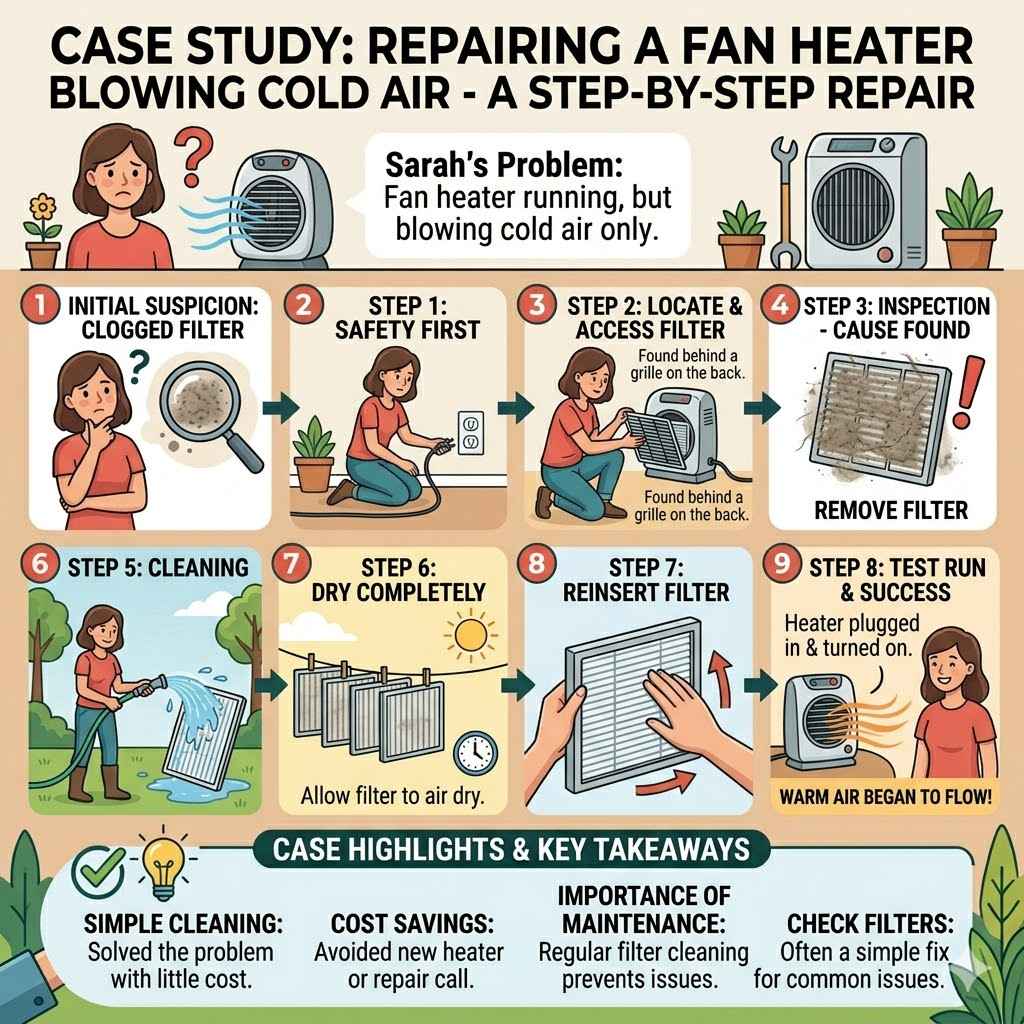
Case Study: Repairing a Fan Heater Blowing Cold Air
Sarah had a fan heater that suddenly stopped providing heat. The fan was running, but only cold air came out. She remembered reading that clogged filters are a common issue, so her first step was to unplug the heater and locate the filter.
She found it behind a grille on the back of the unit. It was covered in a thick layer of dust and pet hair.
She removed the filter and took it outside to clean it with a hose and a soft brush. After it dried completely, she reinserted it into the heater. Plugging the heater back in, she turned it on, and this time, warm air began to flow.
Sarah was thrilled that such a simple cleaning solved the problem, saving her the cost of a new heater or a repair call. This case highlights how regular maintenance can prevent common issues.
Frequently Asked Questions
Question: Why does my fan heater only blow cold air sometimes
Answer: This often happens if the thermostat is set too low, the air filters are clogged, or the heating element has a loose connection. Sometimes, a safety feature designed to prevent overheating might have tripped.
Question: Can I fix a fan heater blowing cold air myself
Answer: Yes, many common issues like clogged filters, thermostat settings, and loose connections can be fixed by yourself with basic troubleshooting and cleaning. Always unplug the heater first.
Question: How do I clean the filter in my fan heater
Answer: Most fan heater filters can be removed by unscrewing a grille or simply pulling them out. Clean them gently with a vacuum cleaner brush attachment or wash them with mild soap and water. Make sure they are completely dry before reinserting.
Question: What if my fan heater still blows cold air after cleaning
Answer: If cleaning doesn’t solve the problem, the issue might be with the heating element, thermostat, or fan motor. These components may need testing or
Question: Is it safe to use a fan heater that smells burnt
Answer: No, a burnt smell is a serious warning sign. It indicates something is overheating or burning inside, posing a fire hazard. Unplug the heater immediately and do not use it until it has been inspected and repaired by a qualified technician.
Summary
You’ve learned how to tackle a fan heater blowing cold air. Simple steps like checking the thermostat and cleaning filters often solve the problem. If those don’t work, looking at heating elements, motors, and wiring can pinpoint the issue.
Regular cleaning and safety checks help prevent future trouble. With this guide, you can get your heater blowing warm air again and stay cozy.